On Tuesday, fourteen-year-old Master Kwame Junior bravely confronted and defeated a massive 14-foot python on a sugarcane plantation in Benyadze, near Elmina in the Komenda-Edina-Eguafo-Abrem (KEEA) Municipality of the Central Region.
This young hero’s courageous deed has earned him widespread admiration, as the snake had been a persistent menace to the residents of the farming community.
Sharing his daunting experience, Junior revealed that he encountered the gigantic python caught in his brother’s trap while on his way to harvest sugarcane for his pigs. The snake, in its desperate bid for freedom, had uprooted vegetation and thrashed violently in the trap.
With careful observation, Junior, aware of the unique breathing pattern of snakes, mustered his courage and decided to slay the struggling serpent. He was guided by the Akan proverb, “se wokum owo a, twa ne tiri preko,” which means, “when you kill a snake, cut off its head to ensure it is dead.”
Demonstrating remarkable skill, Junior first severed the python’s tail before decapitating it after a prolonged and brave struggle. He then fearlessly carried the enormous snake back home, a 15-minute walk, where he was met with jubilant celebration from the community.
Junior urged his fellow residents to remain vigilant while in the forest, noting that this was not his first encounter with a large python in the area and suspecting that more might be nearby.
Kwame Junior’s heroic act has earned him widespread praise and recognition throughout the KEEA Municipality, with many hailing him as a true hero whose bravery serves as an inspiration to all.
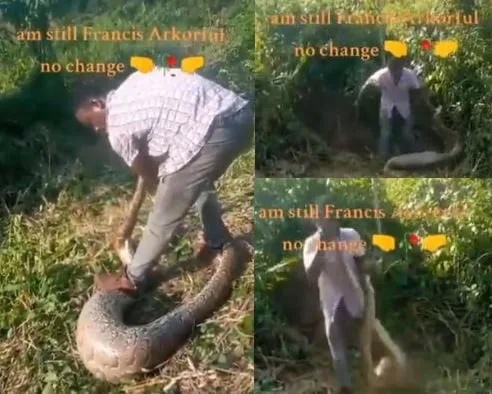
In a captivating video circulating online, a fearless Ghanaian farmer showcased an extraordinary battle with a formidable opponent – a massive python that had invaded his farm.
The footage unfolds as the farmer fearlessly engages in a gripping tussle with the imposing serpent.
Initiating the encounter, the farmer seizes the python’s tail, setting the stage for a dramatic struggle. The formidable snake, not one to be underestimated, retaliates by attempting to bite its assailant. Undeterred, the farmer wields a machete, delivering calculated strikes to the serpent’s head as it fiercely counters.
In a surprising turn of events, the farmer manages to subdue the python by stepping on its neck.
What follows is a display of both skill and audacity as he blows air into the snake’s mouth, like the act of performing cardiopulmonary resuscitation, and even goes so far as to bite its tail.
Pythons, said to be non-venomous snakes, can range from 23 inches to 33 feet in length, and they can weigh from 7 ounces to 250 pounds.
Pythons live in a wide range of habitats, depending on the species, but many seek shelter in trees and can hold onto branches with their tails.
According to the San Diego Zoo Wildlife Explorers, pythons don’t chase after their dinner. They are ambush hunters that can locate warm-blooded animals by using heat-sensing “pits” or holes along their jaw.
They wait until the animal comes close, then a python grabs the prey with its sharp, backward-curving teeth, wraps coils of its body around the prey, and squeezes tight.
The snake is not trying to crush its prey; its goal is to stop its potential meal from breathing. After that, the python unfolds its flexible jaw, opens wide, and swallows its prey whole—usually head first—flexing and contracting its muscles to move the meal down its throat and into its stomach.
Pythons move forward in a straight line by stiffening their ribs, lifting a set of scales on their belly and moving them forward, so the loose ends grab the surface to push them ahead. They move slowly, though, at about one mile per hour.
Python is one of the most popular programming languages in the world and for good reason. It’s versatile, easy to learn, and has a wide range of applications.
Whether you’re a beginner or an experienced programmer, learning Python can be a valuable skill that can open up new opportunities for you in the tech industry. In this article, we’ll take a closer look at how to create your first Python program and start your journey in Python programming.
What Is Python Used For
Before we dive into creating your first program, let’s briefly go over what Python is and what it’s used for. Python is a high-level programming language that was first released in 1991. It’s known for its simplicity, readability, and clean syntax, which makes it easy to learn and understand. Python is used for a variety of applications, including web development, data analysis, machine learning, and more.
Python Installation
Now that you have a basic understanding of what Python is and what it’s used for, let’s get started with creating your first program. The first thing you’ll need to do is download and install Python on your computer. You can download Python from the official Python website (https://www.python.org), which offers versions for Windows, Mac, and Linux.
PyCharm IDE Installation
PyCharm is a popular integrated development environment (IDE) for Python that makes it easy to write, debug, and test your code. If you haven’t already, download and install PyCharm on your computer. To install PyCharm, download the installer from the official website (https://www.jetbrains.com/pycharm/), and follow the installation process.
PyCharm is available in two versions: the Community Edition and the Professional Edition. The Community Edition of PyCharm is free and open-source, while the Professional Edition is a paid version that includes additional features such as database support, web development tools, and scientific tools.
Creating Your First Python Program
Now, let’s get started with creating our first Python program!
In case you are searching for a useful resource to assist you in developing your initial Python program, consider referring to the helpful video tutorial attached to the bottom of this article, titled “Learn Python Programming – Your First Python Program Tutorial” created by Code With Dee.
The video provides a comprehensive guide on this subject matter and also includes supplementary suggestions and techniques to help you prepare your first Python program successfully. You can also access the video on YouTube, visit the link provided: https://www.youtube.com/watch?v=-kZS5ZMpPjw.
Or you can follow the steps below to create your first Python program!
Step 1: Open PyCharm and create a new Python file
The first step in creating your first Python program is to open PyCharm and create a new Python file. To do this, open PyCharm and click “File” > “New Project”. Choose the location where you want to save your project and give it a name. Click “Create”.
Next, right-click on your project name in the left-hand sidebar and click “New” > “Python File”. Give your file a name (e.g. “hello.py”) and click “OK”.
Step 2: Write the code
Now that you have created your new Python file, it’s time to write your code. In the empty Python file, type the following code:
name = input(“What is your name? “) print(“Hello, ” + name) print(name + ” says, Hello World!”)
This code prompts the user to enter their name, greets them, and then prints a message saying that the user said “Hello World!”.
Let’s break down this code and understand what each line does:
name = input(“What is your name? “): This line prompts the user to enter their name and stores it in the variable called “name”.
print(“Hello, ” + name): This line greets the user by printing “Hello” followed by their name.
print(name + ” says, Hello World!”): This line prints a message saying that the user said, “Hello World!”.
Step 3: Run the code
Once you’ve written your code, it’s time to run it and see the results! To run your program in PyCharm, click the green “Run” button in the top-right corner of the screen, or press “Ctrl+Shift+F10” on your keyboard.
PyCharm will run your code and display the output in the “Run” window at the bottom of the screen. You should see a prompt asking “What is your name?”.
Type your name and press “Enter”. PyCharm will then print your greeting and the message “YourName says, Hello World!” to the console.
Congratulations, you’ve created your first Python program!
Step 4: Debugging your code
While writing your Python code, you may encounter errors that prevent your code from running as intended. PyCharm has a built-in debugger that can help you find and fix these errors.
To use the debugger, simply set a breakpoint in your code by clicking on the left-hand side of the line you want to debug. When you run your code in debug mode, PyCharm will stop at the breakpoint and allow you to step through your code line by line to see where the error occurs.
Step 5: Saving your code
Once you’ve written and debugged your code, it’s important to save your work. To save your code in PyCharm, simply click “File” > “Save” or “Save As” and choose the location where you want to save your file.
It’s always a good idea to save your work frequently to avoid losing any progress if your computer crashes or if something else goes wrong.
Step 6: Further learning
Congratulations, you have created your first Python program using PyCharm! This is just the beginning of your journey into the world of programming. Python is a vast language with a lot to learn, and there are many resources available online to help you continue your learning journey. Here are a few suggestions for what to learn next:
1. Learn about variables and data types: In the example we used earlier, we used a variable called “name” to store the user’s name. Learn more about variables and data types to understand how they work and how to use them effectively in your code.
2. Explore control structures: Control structures like loops and conditional statements are essential to writing effective programs. Learn more about them to understand how to make your code more efficient and versatile.
3. Discover Python libraries: Python has many libraries and frameworks that can make your life easier as a programmer. Learn about popular libraries like NumPy, Pandas, and Matplotlib to start exploring what Python can do.
Conclusion
Python is an excellent language for beginners and experienced programmers alike, and PyCharm is a powerful tool that can help you write, debug, and test your Python code. By following these steps, you should now be able to create your first Python program and continue your journey into the world of programming.
Remember to practice often, ask questions, and explore new concepts to continue improving your skills. Happy coding!